This is default featured slide 1 title

Go to Blogger edit html and find these sentences.Now replace these sentences with your own descriptions.This theme is Bloggerized by Lasantha Bandara - Premiumbloggertemplates.com.

This is default featured slide 2 title

Go to Blogger edit html and find these sentences.Now replace these sentences with your own descriptions.This theme is Bloggerized by Lasantha Bandara - Premiumbloggertemplates.com.

This is default featured slide 3 title

Go to Blogger edit html and find these sentences.Now replace these sentences with your own descriptions.This theme is Bloggerized by Lasantha Bandara - Premiumbloggertemplates.com.

This is default featured slide 4 title

Go to Blogger edit html and find these sentences.Now replace these sentences with your own descriptions.This theme is Bloggerized by Lasantha Bandara - Premiumbloggertemplates.com.

This is default featured slide 5 title

Go to Blogger edit html and find these sentences.Now replace these sentences with your own descriptions.This theme is Bloggerized by Lasantha Bandara - Premiumbloggertemplates.com.

ads

Showing posts with label Internet Browser. Show all posts

Friday, 22 February 2013

How to view saved password in google chrome


Friends, here is a very easy trick from which u can find the passwords of your friends which are save in their google chrome browaer...

Steps:

1. Open Google Chrome
2. Go to Settings.

3. Then Click on Advance Settings

4. Scroll Down and their will be password and forms from their click on Manage saved password.
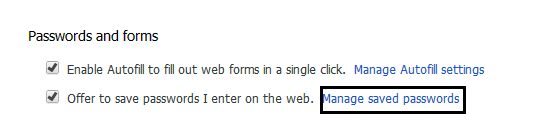
Then list of all websites whose passwords are saved on browser will be listed. In My case

5. Click on show to view those passwords
Enjoy!!

Tuesday, 19 February 2013

Secure Chrome with Password


Friends,tou can now protect google chrome with password. U can secure Saved Password, Important Bookmarks, etc... with this "Simple Password Startup" Extension. 

So let's see how to secure Google Chrome with password.

Steps:

 1. Install the "Simple Password Startup" Extension in your Chrome

After installing 
2. Go to "Tools" --> "Extension" --> "Simple Password Startup" --> "Option"
3. After that Enter a Password and Save it.
Now your Google Chrome is secured with Password.

This is a very easiest way to protect your "Saved Password" and "Bookmarks" from unknown persons.

Friday, 15 February 2013

How to use free internet on ufone


Assalam o Alaikum!
Frinds Today I came with wonderful trick
"How to use free internet on ufone???"
As the name suggest am going to tell you how to use free internet on ufone
For this purpose you have activated mms gprs on
your ufone SIM. You can check VAS Details from this code.
 *336*1*5#
Now Set your connection according to this configration:
  
  • APN                 :Ufone.Pmms
  • Proxy                :172.16.13.26
  • Port                   :8080
  • Primary dns       :8.8.8.8 
  • Secondry dns    :8.8.4.4
No need for balance for the first activation use with zero balance...
Plz share this trick to your friends thanks............

Sunday, 3 February 2013

How to know who is on your wifi


Frinds. u know that many of us want to get rid of others peoples on your wifi, and u want to know who they are. Here is software for your this problem.
                            
                            Downlaod here

Friday, 7 December 2012

Hide IP Browser v2.0 Full CRACK


Hide-IP-Browser v2.0 | 2 Mb
The ultimate hide IP address software. Find out how to hide your IP address easily. Hiding your real IP address is the only technique that can help you protect your identity while browsing the web. By using Hide-IP-Browser you can surf any Web Site, Web-based Email services, Newsgroups, Web Blogs and Forums using a different IP address.
DOWNLOAD
How it Works?
Hide-IP-Browser protects your identity by replacing your real IP address with a different one. You will appear to access the internet from a different location, not your own. Your real location is never revealed. We are using proxies from different countries to hide your IP address. A partial country list from where you can get a new IP address is this: United States, United Kingdom, Israel, Canada, Germany, Japan, Netherlands, and many more
http://www.mediafire.com/?ri3qdn65117fx5j
                 ---Download here-----

Friday, 30 November 2012

Top 10 Firefox add-ons of 2013


Below is a listing of our top 10 favorite Firefox add-ons or extensions. Part of what makes Mozilla Firefox so great is all the available add-ons and installing these add-ons can help improve your abilities and the overall feel of Firefox. Each of these add-ons can be found through theMozilla Firefox add-ons page or through the links provided below.

StumbleUpon
Great add-on that works with StumbleUpon that allows you to browse only the best of what the Internet has to offer.
AnyColor
Another fantastic add-on that allows you to change the color and appearance of Firefox to any color of your choice.
Download Statusbar
Often one of the first add-ons we install after installing Firefox for the first time. This add-on displays the download status on the status bar instead of opening a new download window.
TinyURL Generator
Another great add-on that allows you to click a small icon in the bottom corner of the Firefox window to quickly generate a small URL for the page you're looking at. This is fantastic if you find yourself sharing long URL links often.
WOT
Fantastic add-on that helps keep your web surfing secure. The add-on will display a warning screen across a web page if it's deemed insecure. A security warning could be caused when the web page is known to participate in phishing, has Trojans, scams, etc.
Omnibar
Another great add-on that turns your URL bar into a Google search as well as the address bar. This helps save your browser real-estate space by removing the redundant Google Search box.
AutoCopy
Another great add-on that allows you to quickly copy and paste text. A must for any blogger who finds themselves frequently copying and pasting text. highlighting the text will immediately copy that text, without having to right-click and select copy or using a keyboard shortcut.
Adblock Plus
Another add-on that's a must for users who're sick of sites that plaster advertising on their pages. This great add-on allows you to add and remove advertisements from a web page so you don't have to look at them.
Read It Later
Another great add-on that helps eliminate the dozens of tabs some users keep open because they haven't finished or started reading that tab.
Time Tracker
Finally, this little gem allows you to keep track of how much time you're spending in Firefox by displaying a little clock in the right portion of the status bar.